What happens when you type google.com in your browser and press Enter?

Software Engineer
Have you ever wondered what happens when you type google.com into your browser? In this article, we will cover the infrastructure side (network, servers, security...) of the question.
DNS (Domain Name Service) request
Computers and other devices communicate using IP addresses to identify each other on the internet. But humans can't remember IP addresses so they use words. The Domain Name Service(DNS) brings the two together and brings you your search results. It's more like peanut butter meets jelly. An IP address, say for google.com is 8.8.8.8**.** Once the two match you get your results. That's how DNS request works. Think of DNS as an address book for websites.
TCP/IP
Transmission Control Protocol (TCP) and Internet Protocol (IP) are communication protocols that define how data should travel across the internet. When you type google.com and press enter you are requesting a web page. Your device sends TCP packets to the web server's address asking it to send the web page back to you. The web server sends chunks of packets to you and joins them together to form the web page. The browser sends TCP packets to the server and the server responds by sending TCP packets back. This results in you getting the web page you requested.
Firewall
The next step is the firewall. A firewall allows, limits, or blocks network traffic by analyzing data packets. This helps in preventing unauthorized access from entering a private network. A firewall can do this by adhering to preconfigured rules. This makes sure your computer or device is safe when you access the internet.
HTTPS/SSL
Hyper Text Transfer Protocol Secure(HTTPS) allows you to access the website securely as this ensures all data is encrypted. It is essential to validate whether the site you are using is secure. If the site is not secure you will see a message saying "Not secure" next the the address bar. It does so by employing one of the protocols namely Secure Socket Layer(SSL). This is what guarantees the safety of the page you are visiting.
Load balancer
When you "google" chances are you are not the only one trying to make a request. There may be millions of you trying to do that, and that is a lot of traffic. How does Google handle so much traffic? This is where a load balancer comes in. A load balancer helps in distributing the web traffic or workload to tens of thousands of Google servers by using a specified algorithm. This increases the efficiency, reliability, and availability of the domain google.com.
Web server
You've probably been wondering where these pages come from, well they are delivered by a web server. To fetch a webpage, your browser sends a request to the web server which searches for the requested document in its own storage space. Once the webpage is found the web server reads it, processes it, and finally sends it to the browser. And that's how you can access google.com.
Note: Do not confuse a web server with a server. A server is a physical device, an actual computer.
Application server
An application server serves as a host for the user's business logic while facilitating access to and performance of a business application. When you type google.com into your browser, Google's application servers play a crucial role in serving the web page and providing search functionality among other tasks. Application servers often sit behind web servers and handle application-specific tasks after the web server has processed incoming requests.
Database
While databases may not directly serve the initial Google homepage when you type google.com, they are integral to many aspects of Google's operations, including search, personalization, advertising, analytics, and infrastructure management. They help in organizing and storing the vast amount of information available on the web.
That's what happens when you type google.com on your browser.
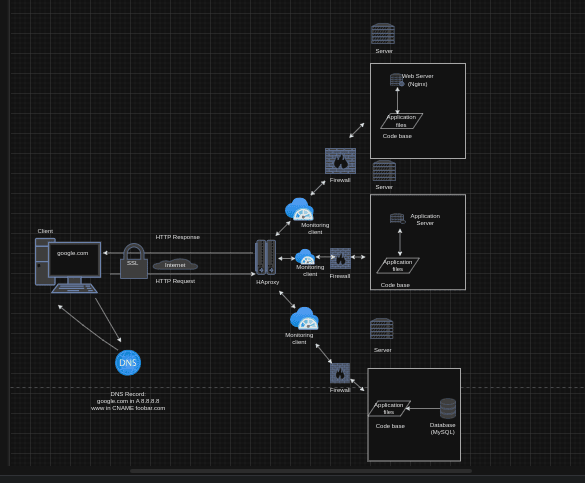
The following schema illustrates the flow of the request created when you type https://www.google.com in your browser and press Enter
Happy coding!


